

First, go here to log in:
https://www.your-site.com/wp-admin
* replace www.your-site.com with your domain
Before you begin
You will need:
- Your phone
- Access to your WordPress login page
- One authenticator app installed on your phone
Use one of these free apps on your phone
Both apps are available on the official Apple App Store and Google Play store for Android. You may also use your favorite authenticator app that generates Time-based One-Time Passwords (TOTP).
Google Authenticator Apple App Store Google Play Store | Microsoft Authenticator Apple App Store Google Play Store |
Setup Steps (takes just a few minutes)
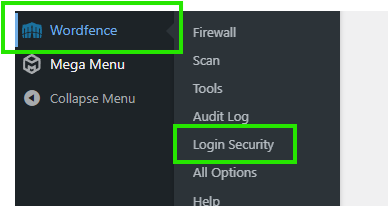
- After you log in, go to WordFence in the left menu and choose Login Security.
- Open your authenticator app on your phone and tap the + button (or scan icon) to add a new account.
- Add your website to the app
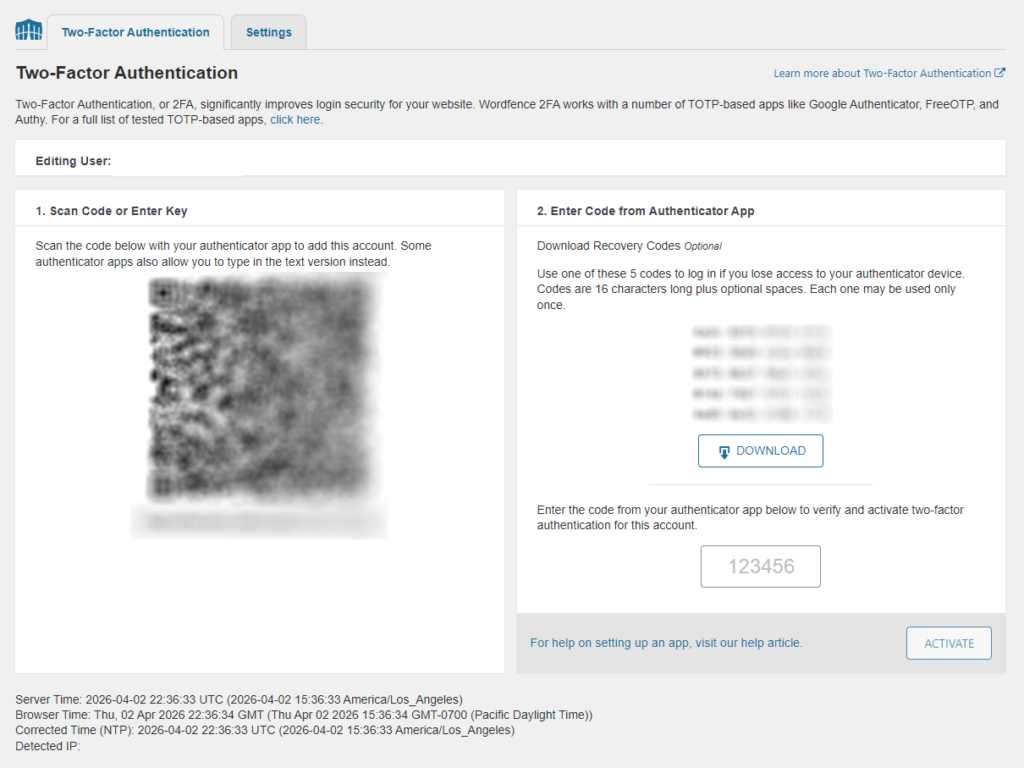
Option A (recommended): Hold your phone camera up to the QR code shown on your screen until it beeps and adds the account.
Option B: If you are on your phone and cannot scan the screen, look below the QR code for the long setup key. In the app choose “Enter key manually” and paste or type that key.
- Save your recovery codes
On the same page as the QR code, click the Download button and save the codes somewhere safe (print them or store the file securely). These are your backup, in case you ever lose your phone.
- Type the current 6-digit code shown in your authenticator app into the box on the screen, then click Activate.
You’re all set!
To log in next time
Each time you log in:
- Go to https://www.your-site.com/wp-admin/
- Enter your username and password.
- Open your authenticator app and enter the current 6-digit code.
Helpful Tips
- The 6-digit code changes every 30 seconds. If the timer is almost done, wait for the next code.
- Keep your recovery codes in a safe place and do not share them.
- If you switch phones later, you can deactivate 2FA and set it up again from the Login Security page.
- If you get stuck and,
- Are an existing client, contact us using this Support form and we can help
OR - Are a Lee & Associates client or office representative, please contact us using this form in lieu of our standard support form above.
- Are an existing client, contact us using this Support form and we can help